

Ngôn ngữ lập trình Java · Phần 50/62
Lớp ObjectInputStream và ObjectOutputStream trong Java
1. Lớp ObjectInputStream trong Java Lớp ObjectInputStream nằm trong package java.io được sử dụng để đọc...
Kết quả sẽ mở trong tab mới, giới hạn trong website này.
Truy cập nhanh
Tìm kiếm gần đây
List trong Python giống như mảng động (dynamic array) trong C++ hay Java. List có thể chứa các phần tử có kiểu dữ liệu bất kỳ như integer, float, String,…Hay nói đúng hơn là List có thể chứa bất kỳ object nào. Trong Python, chúng ta có thể dễ dàng thêm hoặc xóa các phần […]
List trong Python giống như mảng động (dynamic array) trong C++ hay Java. List có thể chứa các phần tử có kiểu dữ liệu bất kỳ như integer, float, String,…Hay nói đúng hơn là List có thể chứa bất kỳ object nào. Trong Python, chúng ta có thể dễ dàng thêm hoặc xóa các phần tử trong một List.
List trong Python được tạo bằng cách sử dụng dấu ngoặc vuông [] (square bracket). Ví dụ:
# Creating a blank List
List = []
print("Blank List: ")
print(List)
# Creating a List of numbers
List = [10, 20, 14]
print("List of numbers: ")
print(List)
# Creating a List of strings
List = ["John", "Marry", "Kane"]
print(List)
# Creating a Multi-Dimensional List
# (By Nesting a list inside a List)
List = [['John', 'Marry'], ['Kane']]
print("Multi-Dimensional List: ")
print(List)
# Creating a List with mixed data types
List = [1, "Hello", 3.4]
print("List with mixed data types: ")
print(List)
Blank List:
[]
List of numbers:
[10, 20, 14]
['John', 'Marry', 'Kane']
Multi-Dimensional List:
[['John', 'Marry'], ['Kane']]
List with mixed data types:
[1, 'Hello', 3.4]
List = [1, 1, 4, 4, 3, 3, 3, 6, 5]
print("List with the use of Numbers: ")
print(List)

List = [1, 2, 'Gochocit', 4, 'Hello', 6, 'Gochocit']
print("List with the use of Mixed Values: ")
print(List)
List with the use of Numbers:
[1, 1, 4, 4, 3, 3, 3, 6, 5]
List with the use of Mixed Values:
[1, 2, 'Gochocit', 4, 'Hello', 6, 'Gochocit']
Python hỗ trợ hàm len() để giúp lấy ra số phần tử (kích thước) của một danh sách.
num_List = [1, 1, 4, 4, 3, 3, 3, 6, 5]
print("Size of num_List: ")
print(len(num_List))

mixed_List = [1, 2, 'Gochocit', 4, 'Hello', 6, 'Gochocit']
print("Size of mixed_List: ")
print(len(mixed_List))
Size of num_List:
9
Size of mixed_List:
7
Các phần tử trong List được đánh chỉ mục (index) theo thứ tự. Index là một số nguyên và bắt đầu bằng 0. Nếu List có 5 phần tử thì index sẽ từ 0 đến 4. Dựa vào chỉ mục (index), chúng ta có thể truy cập từng phần tử trong List.
my_list = ['g', 'o', 'c', 'h', 'o', 'c', 'i', 't']

# first item
print(my_list[0])  # g

# third item
print(my_list[2])  # c

# fifth item
print(my_list[4])  # o

# Nested List
n_list = ["Hello", [2, 0, 1, 5]]

# Nested indexing
print(n_list[0][1]) # e

print(n_list[1][3]) # 5
Nếu truy cập index không nằm trong khoảng index của List thì sẽ gây ra lỗi IndexError. Nếu index không phải là kiểu integer thì sẽ gây ra lỗi TypeError.
my_list = ['g', 'o', 'c', 'h', 'o', 'c', 'i', 't']
#IndexError: list index out of range
print(my_list[15])
#TypeError: list indices must be integers or slices, not float
print(my_list[4.0])
Index của một List cũng có thể là số nguyên âm. Với index bằng -1 là vị trí của phần tử cuối cùng trong List.
# Negative indexing in lists
my_list = ['p','r','o','b','e']

# last item
print(my_list[-1])

# fifth last item
print(my_list[-5])
e
p
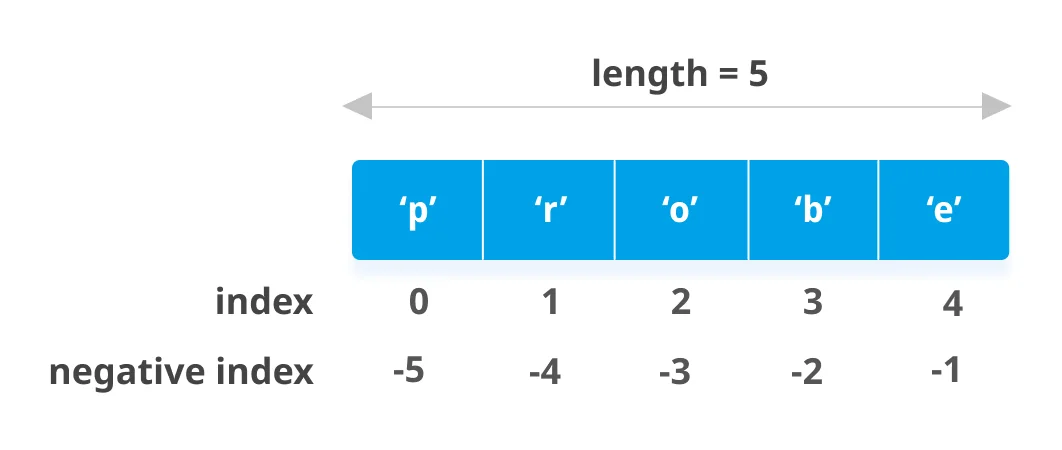
Chúng ta có thể truy xuất một số phần tử liền kề nhau trong List bằng cách sử dụng toán tử slicing :.
my_list = ['g', 'o', 'c', 'h', 'o', 'c', 'i', 't']

# elements from index 2 to index 4
print(my_list[2:5])

# elements from index 5 to end
print(my_list[5:])

# elements beginning to end
print(my_list[:])
['c', 'h', 'o']
['c', 'i', 't']
['g', 'o', 'c', 'h', 'o', 'c', 'i', 't']
Sử dụng toán tử gán = để thay đổi các phần tử trong List hoặc chèn các phần tử trong List.
my_list = [2, 'it', 'hello', 8, 1]

# change the 1st item
my_list[0] = 'Gochocit'
print(my_list)

# change 2nd to 4th items
my_list[1:4] = [3, 5, 'good']
print(my_list)

# insert items into List
my_list[2:2] = ['John', 'Marry', 'Kane']
print(my_list)
['Gochocit', 'it', 'hello', 8, 1]
['Gochocit', 3, 5, 'good', 1]
['Gochocit', 3, 'John', 'Marry', 'Kane', 5, 'good', 1]
Thêm một phần tử, một List hoặc một Tuple vào cuối danh sách.
# Creating a blank List
List = []
print("Initial blank List: ")
print(List)

# Addition of Elements in the List
List.append(1)
List.append(2)
List.append(4)
print("List after Addition of Three elements: ")
print(List)

# Adding elements to the List using Iterator
for i in range(1, 4):
    List.append(i)
print("List after Addition of elements from 1-3: ")
print(List)

# Adding Tuples to the List
List.append((5, 6))
print("List after Addition of a Tuple: ")
print(List)

# Addition of List to a List
List2 = ['Gochocit', 'Hello']
List.append(List2)
print("List after Addition of a List: ")
print(List)
List after Addition of Three elements:
[1, 2, 4]
List after Addition of elements from 1-3:
[1, 2, 4, 1, 2, 3]
List after Addition of a Tuple:
[1, 2, 4, 1, 2, 3, (5, 6)]
List after Addition of a List:
[1, 2, 4, 1, 2, 3, (5, 6), ['Gochocit', 'Hello']]
Chèn các phần tử vào index được chỉ định trước trong List.
# Creating a List
List = [1,2,3,4]
print("Initial List: ")
print(List)

# Addition of Element at specific index
List.insert(3, 12)
List.insert(0, 'Gochocit')
print("List after performing Insert Operation: ")
print(List)
Initial List:
[1, 2, 3, 4]
List after performing Insert Operation:
['Gochocit', 1, 2, 3, 12, 4]
Thêm một số phần tử vào cuối danh sách.
# Creating a List
List = [1, 2, 3, 4]
print("Initial List: ")
print(List)

# Addition of multiple elements to the List at the end
List.extend([8, 'Gochocit', 'Hello'])
print("List after performing Extend Operation: ")
print(List)
Initial List:
[1, 2, 3, 4]
List after performing Extend Operation:
[1, 2, 3, 4, 8, 'Gochocit', 'Hello']
Toán tử + giúp nối 2 List lại với nhau. Toán tử * giúp lặp lại List với số lần cho trước.
num_list = [1, 3, 5]
#Operator +
print(num_list + [9, 7, 5])
#Operator *
print(["it"] * 3)
[1, 3, 5, 9, 7, 5]
['it', 'it', 'it']
Chúng ta có thể xóa một hoặc nhiều phần tử trong List bằng cách sử dụng từ khóa del. Ngoài ra, chúng ta cũng có thể xóa toàn bộ List với từ khóa del.
my_list = [2, 'it', 'hello', 8, 1, 3, 5]

# delete one item
del my_list[2]
print(my_list)

# delete multiple items
del my_list[1:5]
print(my_list)

# delete the entire list
del my_list

# Error: List not defined
print(my_list)
[2, 'it', 8, 1, 3, 5]
[2, 5]
Traceback (most recent call last):
  File "c:\python-examples\example.py", line 15, in <module>
    print(my_list)
NameError: name 'my_list' is not defined
Hàm remove() giúp xóa một phần tử trong List. Hàm pop() giúp xóa phần tử cuối trong List nếu không truyền đối số index. Hàm clear() giúp xóa toàn bộ List.
my_list = [2, 'it', 'hello', 8, 1, 3, 5]

my_list.remove('it')
# Output: [2, 'hello', 8, 1, 3, 5]
print(my_list)

# Output: 'hello'
print(my_list.pop(1))

# Output: [2, 8, 1, 3, 5]
print(my_list)

# Output: '5'
print(my_list.pop())

# Output: [2, 8, 1, 3]
print(my_list)

my_list.clear()
# Output: []
print(my_list)
[2, 'hello', 8, 1, 3, 5]
hello
[2, 8, 1, 3, 5]
5
[2, 8, 1, 3]
[]
Chúng ta có thể xóa các phần tử trong List bằng cách gán danh sách rỗng (empty list) cho List.
my_list = [2, 'it', 'hello', 8, 1, 3, 5]

my_list[2:3] = []
# Output: [2, 'it', 8, 1, 3, 5]
print(my_list)
my_list[2:5] = []
# Output: [2, 'it', 5]
print(my_list)
[2, 'it', 8, 1, 3, 5]
[2, 'it', 5]
1. Lớp ObjectInputStream trong Java Lớp ObjectInputStream nằm trong package java.io được sử dụng để đọc...
1. Chức năng của hàm str_replace() Hàm str_replace() trong PHP có chức năng tìm kiếm một...
Ở bài Cấu trúc dữ liệu Dictionary trong Python, các bạn đã tìm hiểu về Dictionary. Trong...