

Hàm is_int() trong PHP
1. Chức năng của hàm is_int() Hàm is_int() trong PHP có chức năng kiểm tra một...
Kết quả sẽ mở trong tab mới, giới hạn trong website này.
Truy cập nhanh
Tìm kiếm gần đây
1. Map interface trong Java Map interface của Java collections framework giúp lưu trữ cấu trúc dữ liệu dạng map. Các phần tử của Map được lưu trữ dưới dạng cặp key và value. Key có giá trị duy nhất tương ứng với value. Một Map không thể bao gồm 2 key giống nhau. Chúng […]
Map interface của Java collections framework giúp lưu trữ cấu trúc dữ liệu dạng map. Các phần tử của Map được lưu trữ dưới dạng cặp key và value. Key có giá trị duy nhất tương ứng với value. Một Map không thể bao gồm 2 key giống nhau.
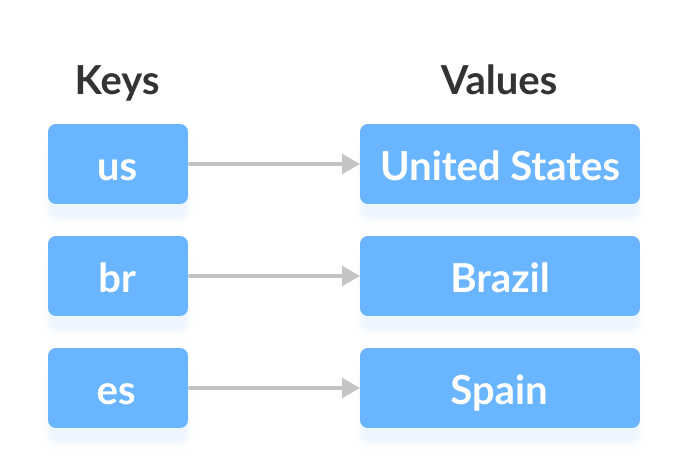
Chúng ta có thể truy cập và chỉnh sửa value tương ứng với key. Trong Map interface chúng ta có 3 tập hợp:
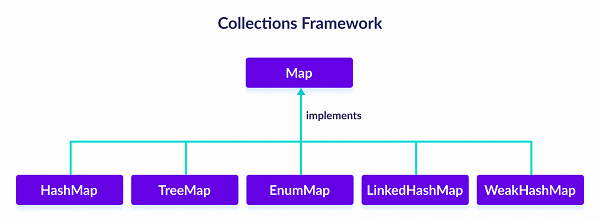
Để sử dụng Map interface thì cần import java.util.Map và tạo đối tượng Map.
// Map implementation using HashMap
Map<Key, Value> numbers = new HashMap<>();
Map interface bao gồm tất cả các phương thức của Collection interface. Ngoài ra, Map interface còn có những phương thức của riêng nó:
put(K, V) thêm cặp key K và value V vào Map. Nếu key đã có trong Map thì value V sẽ thay thế value cũ của key K.putAll() thêm tất cả cặp key và value của một Map vào một Map khác.get(K) trả về value tương ứng với key K trong Map. Nếu key K không có trong Map thì trả về null.containsKey(K) kiểm tra trong Map có tồn tại key K hay không.containsValue(V) kiểm tra value V có tồn tại trong Map hay không.replace(K, V) thay thế value của key K với value mới là value V.replace(K, oldValue, newValue) thay thế value của key K bằng value newValue chỉ khi key K hiện tại có value oldValue.remove(K) xóa key K ra khỏi Map.remove(K, V) xóa key K có value V ra khỏi Map.keySet() trả về tập hợp (set) các key trong Map.values() trả về tập hợp (set) value trong Map.entrySet() trả về tập hợp (set) cặp key và value trong Map.Lớp HashMap trong Java collections framework giúp lưu trữ cấu trúc dữ liệu dạng hash table. Nó lưu trữ các phần tử gồm cặp key và value. Key là duy nhất trong HashMap và tương ứng với value trong HashMap.
Lớp HashMap kế thừa từ Map interface.
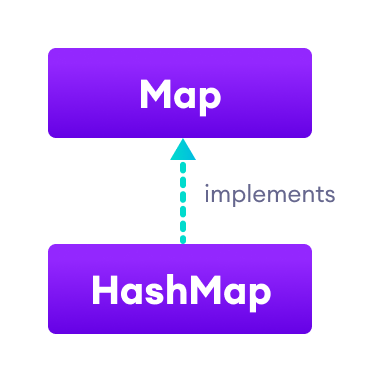
Để sử dụng HashMap, chúng ta cần import java.util.HashMap và tạo HashMap với cú pháp:
// hashMap creation with 8 capacity and 0.6 load factor
HashMap<K, V> numbers = new HashMap<>();
Trong đó, numbers là tên của HashMap được tạo ra, K đại diện cho kiểu dữ liệu của key, V đại diện cho kiểu dữ liệu của value. Ví dụ:
HashMap<String, Integer> numbers = new HashMap<>();Trong ví dụ trên, kiểu dữ liệu của key là String và kiểu dữ liệu của value là Integer.
Để thêm một phần tử vào HashMap, chúng ta sử dụng hàm put().
import java.util.HashMap;
class Main {
  public static void main(String[] args) {
    //tạo HashMap
    HashMap<String, String> capitalCities = new HashMap<String, String>();
    //thêm các phần tử vào Hashmap
    capitalCities.put("England", "London");
    capitalCities.put("Germany", "Berlin");
    capitalCities.put("Norway", "Oslo");
    capitalCities.put("USA", "Washington DC");
    System.out.println("HashMap: " + capitalCities);
  }
}
HashMap: {USA=Washington DC, Norway=Oslo, England=London, Germany=Berlin}Chúng ta sử dụng hàm get() để lấy value của key trong HashMap. Ngoài ra, chúng ta có thể sử dụng hàm keySet(), values(), entrySet() để lấy tập key, tập value, tập key và value trong HashMap.
import java.util.HashMap;
class Main {
  public static void main(String[] args) {
    //tạo HashMap
    HashMap<String, String> capitalCities = new HashMap<String, String>();
    //thêm các phần tử vào Hashmap
    capitalCities.put("England", "London");
    capitalCities.put("Germany", "Berlin");
    capitalCities.put("Norway", "Oslo");
    capitalCities.put("USA", "Washington DC");
    System.out.println("HashMap: " + capitalCities);
    //lấy value của phần tử trong HashMap
    String value = capitalCities.get("England");
    System.out.println("Value of key England: " + value);
    //lấy tập key trong Hashmap
    System.out.println("Keys: " + capitalCities.keySet());

    //lấy tập key trong Hashmap
    System.out.println("Values: " + capitalCities.values());

    //lấy tập key trong Hashmap
    System.out.println("Key/Value mappings: " + capitalCities.entrySet());
  }
}
HashMap: {USA=Washington DC, Norway=Oslo, England=London, Germany=Berlin}
Value of key England: London
Keys: [USA, Norway, England, Germany]
Values: [Washington DC, Oslo, London, Berlin]
Key/Value mappings: [USA=Washington DC, Norway=Oslo, England=London, Germany=Berlin]
Chúng ta sử dụng hàm replace() để thay đổi value tương ứng với key trong HashMap.
import java.util.HashMap;
class Main {
  public static void main(String[] args) {
    //tạo HashMap
    HashMap<String, String> capitalCities = new HashMap<String, String>();
    //thêm các phần tử vào Hashmap
    capitalCities.put("England", "London");
    capitalCities.put("Germany", "Berlin");
    capitalCities.put("Norway", "Oslo");
    capitalCities.put("USA", "Washington DC");
    System.out.println("Original HashMap: " + capitalCities);
    capitalCities.replace("USA", "Washington");
    System.out.println("HashMap using replace(): " + capitalCities);
  }
}
Original HashMap: {USA=Washington DC, Norway=Oslo, England=London, Germany=Berlin}
HashMap using replace(): {USA=Washington, Norway=Oslo, England=London, Germany=Berlin}
Để xóa một phần tử trong HashMap, chúng ta có thể sử dụng hàm remove().
import java.util.HashMap;
class Main {
  public static void main(String[] args) {
    //tạo HashMap
    HashMap<String, String> capitalCities = new HashMap<String, String>();
    //thêm các phần tử vào Hashmap
    capitalCities.put("England", "London");
    capitalCities.put("Germany", "Berlin");
    capitalCities.put("Norway", "Oslo");
    capitalCities.put("USA", "Washington DC");
    System.out.println("Original HashMap: " + capitalCities);
    String value = capitalCities.remove("USA");
    System.out.println("Removed value: " + value);
    System.out.println("Updated HashMap: " + capitalCities);
  }
}
Original HashMap: {USA=Washington DC, Norway=Oslo, England=London, Germany=Berlin}
Removed value: Washington DC
Updated HashMap: {Norway=Oslo, England=London, Germany=Berlin}
import java.util.HashMap;
import java.util.Map.Entry;
class Main {
  public static void main(String[] args) {
    //tạo HashMap
    HashMap<String, String> capitalCities = new HashMap<String, String>();
    //thêm các phần tử vào Hashmap
    capitalCities.put("England", "London");
    capitalCities.put("Germany", "Berlin");
    capitalCities.put("Norway", "Oslo");
    capitalCities.put("USA", "Washington DC");
    System.out.println("HashMap: " + capitalCities);
    // iterate through keys only
    System.out.print("Keys: ");
    for (String key : capitalCities.keySet()) {
      System.out.print(key);
      System.out.print(", ");
    }

    // iterate through values only
    System.out.print("\nValues: ");
    for (String value : capitalCities.values()) {
      System.out.print(value);
      System.out.print(", ");
    }

    // iterate through key/value entries
    System.out.print("\nEntries: ");
    for (Entry<String, String> entry : capitalCities.entrySet()) {
      System.out.print(entry);
      System.out.print(", ");
    }
  }
}
HashMap: {USA=Washington DC, Norway=Oslo, England=London, Germany=Berlin}
Keys: USA, Norway, England, Germany,
Values: Washington DC, Oslo, London, Berlin,
Entries: USA=Washington DC, Norway=Oslo, England=London, Germany=Berlin,
Chúng ta cần sử dụng nested class Map.Entry trong Map interface để lưu trữ cặp key và value của Map.
1. Chức năng của hàm is_int() Hàm is_int() trong PHP có chức năng kiểm tra một...
1. Lớp InputStreamReader trong Java Lớp InputStreamReader nằm trong package java.io được sử dụng để chuyển...
1. Kế thừa (inheritance) trong Python Tính kế thừa (inheritance) là một trong những tính chất...