

Lập trình Web PHP · Phần 12/53
Các loại toán tử (operator) trong PHP
Toán tử (operator) được sử dụng để thực hiện các thao tác trên các biến (variable)...
Kết quả sẽ mở trong tab mới, giới hạn trong website này.
Truy cập nhanh
Tìm kiếm gần đây
Như ví dụ trên, những số 1, 2, 3, 4, 5 được thêm vào trước từng dòng (từng thẻ <li>). Những số này được tăng lên tự động nhờ bộ đếm CSS Counters. CSS Counters giống như một biến. Giá trị của biến này có thể được tăng lên theo số lần sử dụng. Để […]
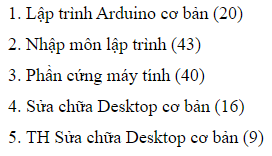
Như ví dụ trên, những số 1, 2, 3, 4, 5 được thêm vào trước từng dòng (từng thẻ <li>). Những số này được tăng lên tự động nhờ bộ đếm CSS Counters.
CSS Counters giống như một biến. Giá trị của biến này có thể được tăng lên theo số lần sử dụng. Để sử dụng CSS Counters, chúng ta có các thuộc tính:
Lưu ý: Bộ đếm phải được tạo ra trước với counter-reset.
<!doctype html>
<html>
  <head>
    <title>CSS Counters</title>
    <style type="text/css">
      li.css-counter-example:before{
        counter-increment: counter1;
        content: counter(counter1) ".";
      }
      li{
        font-size: 18px;
        margin-bottom: 10px;
        list-style-type: none;
      }
      .counter-container {
        counter-reset: counter1;
      }
    </style>
  </head>
  <body>
    <div class='counter-container'>
      <li class="css-counter-example">
        Lập trình Arduino cơ bản (20)
      </li>
      <li class="css-counter-example">
        Nhập môn lập trình (43)
      </li>
      <li class="css-counter-example">
        Phần cứng máy tính (40)
      </li>
      <li class="css-counter-example">
        Sửa chữa Desktop cơ bản (16)
      </li>
      <li class="css-counter-example">
        TH Sửa chữa Desktop cơ bản (9)
      </li>
    </div>
  </body>
</html>
Trong class css .counter-container khởi tạo bộ đếm tên là counter1. Tự động thêm giá trị của bộ đếm trước thẻ <li> có class css .css-counter-example.
<!doctype html>
<html>
  <head>
    <title>CSS Counters</title>
    <style type="text/css">
      li.css-counter-example1:before{
        counter-increment: counter1;
        content: counter(counter1) ".";
      }
      li.css-counter-example2:before{
        counter-increment: counter2;
        content: counter(counter2) ".";
      }
      li{
        font-size: 18px;
        margin-bottom: 10px;
        list-style-type: none;
      }
      .counter-container {
        counter-reset: counter1 counter2;
      }
    </style>
  </head>
  <body>
    <div class='counter-container'>
        <p style="font-size: 20px;font-weight: bold; background-color:green;width: 250px;">Danh sách môn học</p>
      <li class="css-counter-example1">
        Lập trình Arduino cơ bản (20)
      </li>
      <li class="css-counter-example1">
        Nhập môn lập trình (43)
      </li>
      <li class="css-counter-example1">
        Phần cứng máy tính (40)
      </li>
      <li class="css-counter-example1">
        Sửa chữa Desktop cơ bản (16)
      </li>
      <li class="css-counter-example1">
        TH Sửa chữa Desktop cơ bản (9)
      </li>
      <p style="font-size: 20px;font-weight: bold; background-color:green;width: 250px;">Danh sách ngôn ngữ web</p>
      <li class="css-counter-example2">
        Lập trình CSS
      </li>
      <li class="css-counter-example2">
        Lập trình JavaScript
      </li>
      <li class="css-counter-example2">
        Lập trình HTML
      </li>
    </div>
  </body>
</html>
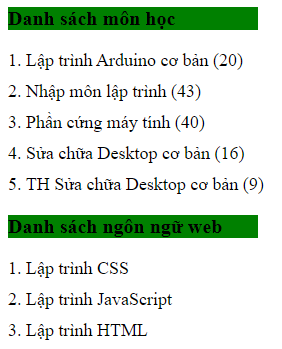
Tạo 2 bộ đếm counter1 và counter2. Tự động thêm giá trị của bộ đếm trước thẻ <li> có class css .css-counter-example1 và .css-counter-example2.
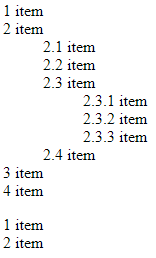
counters() để đánh số tự động cho các phần tử nhiều cấp bậc trong html<!doctype html>
<html>
<head>
<title>CSS Counters</title>
<style type="text/css">
ol{
counter-reset: section;
list-style-type: none;
}
li::before {
counter-increment: section;
content: counters(section,".") " ";
}
</style>
</head>
<body>
<div class='counter-container'>
<ol>
<li>item</li>
<li>item
<ol>
<li>item</li>
<li>item</li>
<li>item
<ol>
<li>item</li>
<li>item</li>
<li>item</li>
</ol>
</li>
<li>item</li>
</ol>
</li>
<li>item</li>
<li>item</li>
</ol>
<ol>
<li>item</li>
<li>item</li>
</ol>
</div>
</body>
</html>
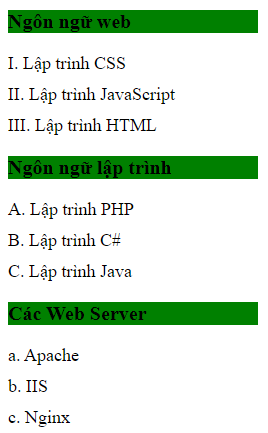
counter()counter(countername, counterstyle)<!DOCTYPE html>
<html>
<head>
<style>
li.css-counter-example1:before{
counter-increment: counter1;
content: counter(counter1, upper-roman) ".";
}
li.css-counter-example2:before{
counter-increment: counter2;
content: counter(counter2, upper-latin) ".";
}
li.css-counter-example3:before{
counter-increment: counter3;
content: counter(counter3, lower-alpha) ".";
}
li{
font-size: 18px;
margin-bottom: 10px;
list-style-type: none;
}
.counter-container {
counter-reset: counter1 counter2 counter3;
}
</style>
</head>
<body>
<div class='counter-container'>
<p>Ngôn ngữ web</p>
<li class="css-counter-example1">
Lập trình CSS
</li>
<li class="css-counter-example1">
Lập trình JavaScript
</li>
<li class="css-counter-example1">
Lập trình HTML
</li>
<p>Ngôn ngữ lập trình</p>
<li class="css-counter-example2">
Lập trình PHP
</li>
<li class="css-counter-example2">
Lập trình C#
</li>
<li class="css-counter-example2">
Lập trình Java
</li>
<p>Các Web Server</p>
<li class="css-counter-example3">
Apache
</li>
<li class="css-counter-example3">
IIS
</li>
<li class="css-counter-example3">
Nginx
</li>
</div>
</body>
</html>
Toán tử (operator) được sử dụng để thực hiện các thao tác trên các biến (variable)...
Hàm (function) là một đoạn chương trình được đặt tên, có đầu vào và đầu ra. Hàm...
Bài này sẽ giới thiệu các kiểu dữ liệu (data type) trong PHP. Để học tốt...